
World of Warcraft addon
Full Send UI for Mythic+, raids and PvP
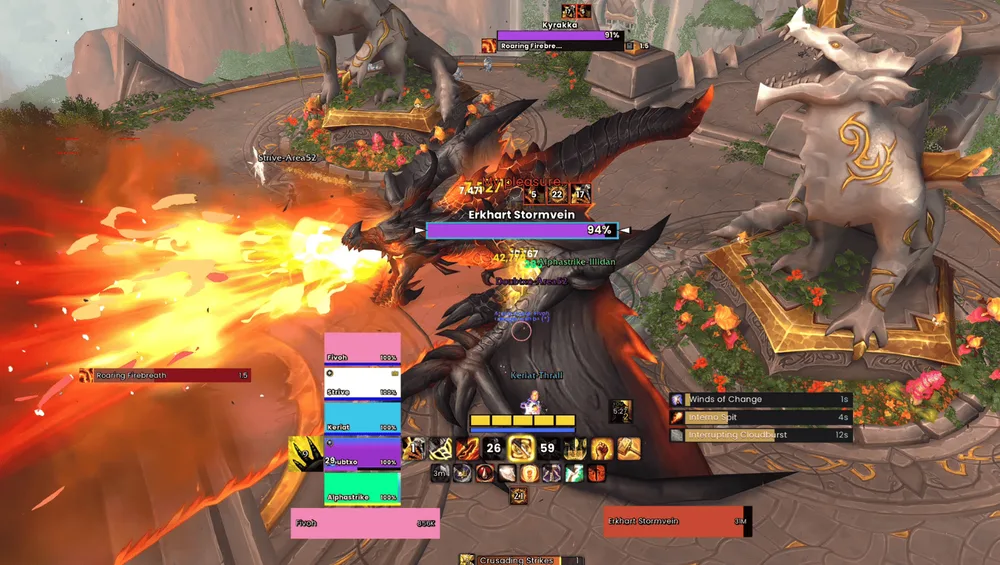
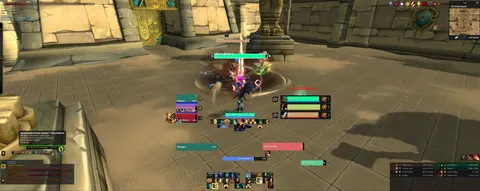
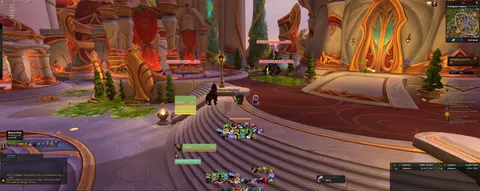
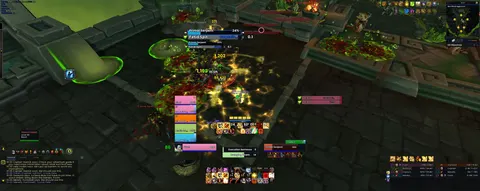
FullSendUI is one addon for your whole WoW UI: unit and raid frames, nameplates, action bars, arena frames, a combat meter and a Mythic+ timer. Turn on the parts you want, or load a profile another player shared.










Get started
-
01
Install it
Get it on CurseForge with the CurseForge app, or download the ZIP and put the FullSendUI folder in
World of Warcraft\_retail_\Interface\AddOns. -
02
Set it up
Log in and pick a look, your screen layout and the features you want. Type
/fuito change anything later. -
03
Load a profile
Copy a profile's import string here. In game, type
/fui, open Profiles, choose Import, paste the string, then Import & Reload.
What's in it
Every feature is a switch in /fui.
Shared UI 20
- Action Bars
- Unit Frames
- Party / Raid Frames
- Party Alerts
- Nameplates
- Important Casts
- Combat Meter
- Cooldown Manager
- Buff Tracker
- Resource Bar
- Buff Reminder
- Class Alerts
- Player Cast Bar
- Spell Streaming
- Smart TAB
- Blizzard UI
- Minimap
- Bags
- Character Lookup
- Chat
PvP 11
- Arena Frames
- Enemy Defensive Auras
- Offensive Buffs
- Notification Icons
- Healer Marker
- Healer CC Alert
- Queue Warning
- Enemy Roster
- Cap Timers
- Win Conditions
- Arena Auto Logger
PvE 10
- Boss Frames
- Mythic+ Tracker
- Dungeon Alerts
- Dungeon Voice
- Enemy Casts
- Player Debuffs
- Pre-Key Check
- Battle Res
- Sated Tracker
- Dungeon Auto Logger